Skip to content

Transcript Generator

Make a 4-Year Homeschool Transcript for College

Enter courses, grades and credits once and produce a clean, official-looking transcript with a calculated GPA, ready to print or export to PDF for college applications.

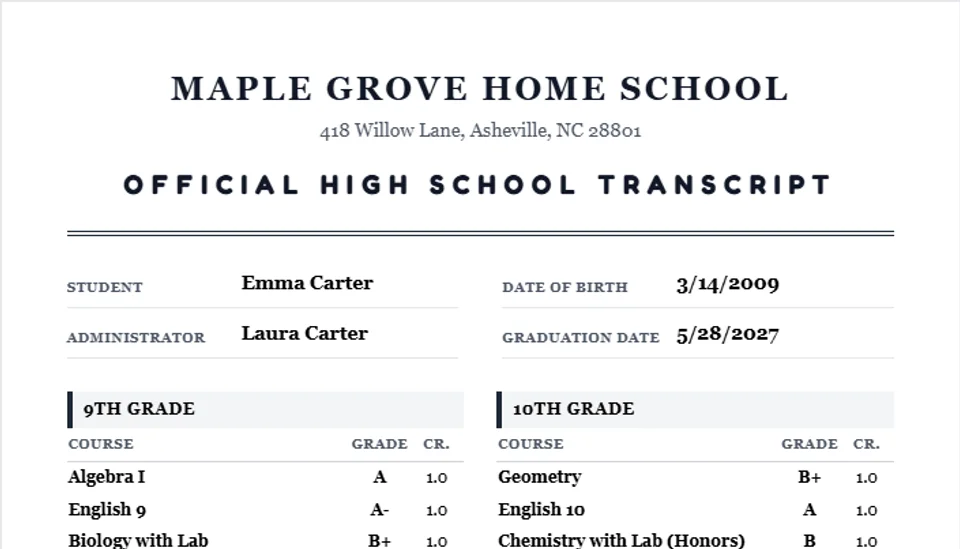
Sample four-year homeschool transcript made with the Transcript Generator

Homeschool Transcript Maker

All four years of high school on one college-ready transcript.

Student & School

Add a Course

How to make a homeschool transcript

In a homeschool, the parent is the school administrator, so the transcript you sign is the official record. Colleges read it the way they read any school’s transcript: they look for every course, a grade and credits for each one, a GPA and a grading scale they can follow.

  1. List the courses by year. Group them under 9th, 10th, 11th and 12th grade. A course taken in 8th grade at high school level, such as Algebra I, can go under the year it was taken.
  2. Give each course credits. A full-year course is usually 1 credit, a semester course 0.5. The traditional Carnegie unit is 120 hours of class time, and many families count 120 to 180 hours of work as one credit.
  3. Record the final grade. Use the same scale for every course. The tool uses A = 4.0 down to F = 0 and prints the scale on the transcript.
  4. Mark honors, AP and college courses. Choose the level when you add the course. The transcript then shows both the unweighted GPA and a weighted GPA.
  5. Add short course descriptions. One line with the textbook or curriculum and the main topics helps an admissions officer judge the rigor. Longer descriptions usually go on a separate course description page.
  6. Sign and date it. Print the transcript, sign it as administrator and keep a copy in your records.

The GPA math works like this: each grade is worth points (A = 4, B = 3), multiplied by the course credits, then divided by the total credits. A student with an A in a 1-credit course and a B in a 0.5-credit course has (4 × 1 + 3 × 0.5) ÷ 1.5 = 3.67. Course grades from assignments can be calculated with the free grade calculator.

Standardized test results do not go in the course list, but colleges ask for them separately. Keep them in one place with the test score tracker, and read how homeschoolers apply to selective colleges.

Want the rest of the package on paper? The High School Transcript Kit adds a four-year plan, credit hours logs, written course description examples, a school profile, a counselor letter and a senior year checklist.

Transcript questions parents ask

What goes on a homeschool transcript?

The student’s name and date of birth, the name and address of your homeschool, every high school course with the year it was taken, the final grade and the credits earned, a GPA, the grading scale you used, the graduation date, and the signature of the parent who administers the homeschool.

How many credits is one homeschool course?

A full-year course is usually 1 credit and a one-semester course 0.5. The traditional Carnegie unit is 120 hours of class time; many homeschool families count 120 to 180 hours of work as one credit. Pick one rule and use it for every course.

Should I use a weighted or unweighted GPA?

Always show the unweighted GPA on the 4.0 scale. If your student took honors, AP or dual-enrollment courses, you can also show a weighted GPA (commonly +0.5 for honors and +1.0 for AP or college courses). Many colleges recalculate GPA with their own method, so label which scale each number uses.

Do colleges accept transcripts made by parents?

Yes. In a homeschool the parent is the school administrator, so the transcript you sign is the official one. Colleges look for a clear format, consistent grading and course descriptions, and they often weigh test scores and dual-enrollment grades alongside it.

When should I start the transcript?

In 9th grade. Add each course the week it ends, while the grade, the credits and the books you used are fresh. Rebuilding four years from memory in senior fall is where most mistakes happen.

Can I include courses taken before 9th grade?

Yes, when they are high school level, such as Algebra I or a high school foreign language taken in 8th grade. List them under the year they were taken and note that they were high school credit.

Helpful supplies

As an Amazon Associate we earn from qualifying purchases, at no extra cost to you. It helps keep these tools free.

Compare curriculum and supplies in our buying guides

Related Tools

Features

Everything the tool does, built to save you time.

Official transcript layout

A clean, formatted academic record with student info, coursework table and signature block that looks credible to admissions officers.

Automatic GPA

The cumulative GPA recalculates on a standard 4.0 scale as you add courses, grades and credits — no manual math.

Course descriptions

Add an optional description to any course so admissions officers see the rigor behind each title.

PDF export

Export the finished transcript to PDF with one click, ready to upload to a college application portal.

Print-ready

Print a clean copy for your portfolio, evaluator, or in-person admissions meeting.

How it works

How it works

01

Enter student info

Add the student name, grade level and school year. The header formats itself automatically.

02

Add courses

Enter each course title, final grade, credits and an optional description. The GPA updates live.

03

Print or export

Preview the transcript, then print it or export to PDF for your college application.

Who it helps

Built for everyone at the table

For parents

  • Produce a credible transcript without formatting it from scratch
  • Let the tool handle GPA math on a standard 4.0 scale
  • Export a PDF that uploads straight to college application portals

For students

  • See the official record of their high school work take shape
  • Understand how each course and grade contributes to the GPA
  • Walk into applications with a document that looks professional

For admissions & evaluators

  • Receive a standard, easy-to-read transcript format
  • Course descriptions provide context for homeschool coursework

Use cases

Real homeschool scenarios

College application

Build the transcript over four years, then export a PDF in senior fall to upload with each application.

Scholarship submission

Attach the printed transcript with its calculated GPA to scholarship and dual-enrollment applications.

Evaluator review

Hand your annual evaluator a clean transcript showing courses, grades and the cumulative GPA.

Course descriptions

Add a one-line description to “Chemistry with Lab” so admissions officers see the rigor behind the title.

FAQ

Frequently asked questions

How do I create a homeschool transcript for college?

+

Open the Transcript Generator, enter your student’s name and grade level, add each course with its final grade and credits, and the tool calculates the cumulative GPA automatically. Preview the transcript, then print it or export to PDF for your college application.

What GPA scale does the transcript use?

+

The tool uses the standard unweighted 4.0 scale (A=4.0, B=3.0, C=2.0, D=1.0, F=0.0) with plus/minus adjustments. The cumulative GPA is a credit-weighted average computed automatically as you add courses.

Can I add course descriptions?

+

Yes. Each course accepts an optional description that appears beneath the course title on the transcript, giving admissions officers context about the rigor and content of the class.

Can I export the transcript to PDF?

+

Yes. Click Export PDF to download a formatted transcript file you can upload to a college application portal or email to an admissions office.

Do colleges accept parent-issued homeschool transcripts?

+

Yes. Most colleges and universities routinely accept parent-generated homeschool transcripts, especially when they are professionally formatted, use a standard 4.0 GPA scale, and include course descriptions.

Is the Transcript Generator free?

+

Yes. It is completely free with no sign-up and no paywall, and nothing you enter is uploaded. Your transcript data stays on your device.

Build a transcript colleges take seriously

Enter your courses, let the GPA calculate itself, and export a PDF ready for every application on your list.